

Hardening guide for JBoss EAP 7.0
A practical hardening guide for JBoss EAP 7.0 web servers covering welcome page removal, custom error handling, jboss-web.xml tuning, and other configuration tweaks that are still missing from the official documentation.

Hardening for JBoss EAP 7.0 Servers
Today I want to share a hardening guide for JBoss EAP 7.0 web servers. Due to the recent version, the existing documentation is very small and some things are not documented yet (and not to mention that the Redhat documentation is not free). So to save your work and not to end up like me ...

Here you can find a specific guide with the configurations that apply to hardenizar a web application that runs on JBoss EAP 7.0.
Welcome page and custom error pages
The default web server includes default welcome pages and for each type of HTTP error that the application may generate (404, 500, etc). It is recommended:
- Hide or replace the welcome page to avoid revealing the software version. To disable the welcome page you can set the Root Web Context value to the value "/" in the jboss-web.xml file:
<?xml version="1.0" encoding="UTF-8"?>
<jboss-web xmlns="http://www.jboss.com/xml/ns/javaee" xmlns:xsi="http://www.w3.org/2001/XMLSchema-instance" xsi:schemaLocation="http://www.jboss.com/xml/ns/javaee http://www.jboss.org/j2ee/schema/jboss-web_5_1.xsd">
<context-root>/</context-root>
</jboss-web>
Another way to disable the welcome page without having to move the value of the path of our application is to remove the following lines from the standalone.xml configuration file:
<location name="/" handler="welcome-content"/>
<handlers>
  <file name="welcome-content" path="${jboss.home.dir}/welcome-content"/>
</handlers>
- Customize the error pages to hide the stack or debug traces generated by the application. This has the objective of hiding internal details of the application to visitors or possible attackers. To configure the application we must modify the web.xml configuration file and add the following configuration:
<error-page>
  <error-code>500</error-code>
  <location>/error.jsp</location>
</error-page>
<error-page>
  <error-code>404</error-code>
  <location>/error404.jsp</location>
</error-page>
1.2 Information headers
The default web server includes information headers that include details such as the type of server, technologies they use, and software versions.
1.2.1 X-Powered-by
It is recommended to remove or customize the value of the X-Powered-By header to avoid revealing information about the product version. This can be done from the web.xml configuration file using the following directives as filters:
<subsystem xmlns="urn:jboss:domain:undertow:3.1">
…
<filters>
  <response-header name="server-header" header-name="Server" header-value="My Own Server"/>
  <response-header name="x-powered-by-header" header-name="X-Powered-By" header-value="My Own Server"/>
</filters>
</subsystem>
1.3 SSL / TLS configuration
Applications that handle sensitive or financial information must operate through secure communication channels. It is recommended to enable TLS as a secure communication channel and configure the server to only allow secure encryption methods and protocols.
1.3.1 Unsafe protocols and encryption
It is recommended to eliminate unsafe protocols such as SSLv2 and SSLv3 and only enable encryption methods (ciphers) that are considered safe. This can be done from the HTTPS listener configuration file through the values ??"enabled-protocols" and "enabled-cipher-suites" as demonstrated below:
<https-listener name="https" secure="true" enabled-protocols="TLSv1.1,TLSv1.2" enabled-cipher-suites="TLS_ECDHE_RSA_WITH_AES_128_CBC_SHA, TLS_ECDHE_RSA_WITH_AES_128_CBC_SHA256,TLS_ECDHE_RSA_WITH_AES_128_GCM_SHA256,TLS_RSA_WITH_AES_128_CBC_SHA, TLS_RSA_WITH_AES_128_CBC_SHA256,TLS_RSA_WITH_AES_128_GCM_SHA256" security-realm="SSLRealm" socket-binding="https"/>
In the previous configuration we only enable encryptions that do not have known security problems and are considered robust but it is recommended to make compatibility tests based on the requirements of the project.
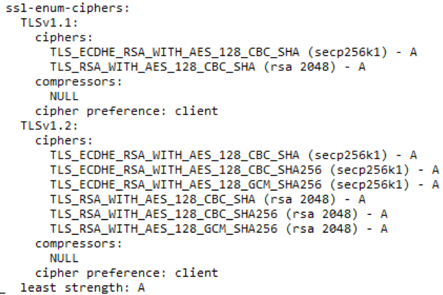
Figure 1 Result of Nmap ssl-enum-ciphers after applying the configuration
Additionally, you can evaluate the configuration of an SSL / TLS server with the Qualys SSLTest tool, available free of charge at the following address: https://www.ssllabs.com/ssltest/
1.3.1 HSTS
This header forces the browser to connect only to the site through the HTTPS protocol. It is important to include a short lifetime while testing this header and ensure that the entire application and resources are transmitted over HTTPS.
Strict-Transport-Security: max-age=86400; includeSubDomains
In the application you can set this value through the following function:
response.addHeader("Strict-Transport-Security", "max-age=86400; includeSubDomains");
More information about this header can be found at the following address:
https://www.owasp.org/index.php/HTTP_Strict_Transport_Security_Cheat_Sheet
1.3.2 HPKP
This security header prevents the use of false or apocryphal certificates and mitigates attacks of the Man In the Middle type. This header should only be implemented in organizations with a certain maturity in the process of handling certificates because bad administration can lead to blocking users of the site. The header has the following format:
Public-Key-Pins: pin-sha256="d6qzRu9zOECb90Uez27xWltNsj0e1Md7GkYYkVoZWmM="; pin-sha256="E9CZ9INDbd+2eRQozYqqbQ2yXLVKB9+xcprMF+44U1g="; report-uri="http://example.com/pkp-report"; max-age=10000; includeSubDomains
In the application you can set this value through the following function:
response.addHeader("Public-Key-Pins ", ‘sha256="d6qzRu9zOECb90Uez27xWltNsj0e1Md7GkYYkVoZWmM="; pin-sha256="E9CZ9INDbd+2eRQozYqqbQ2yXLVKB9+xcprMF+44U1g="; report-uri="http://example.com/pkp-report"; max-age=10000; includeSubDomains’);
HPKP: https://www.owasp.org/index.php/OWASP_Secure_Headers_Project#hpkp
1.4 Security headers
There are security headers that are implemented in all modern web browsers that can be used to increase the security level of the application.
For more information about these headers, visit the following page:
https://www.owasp.org/images/6/6a/Headers_seguros.pdf
1.4.1 X-XSS-PROTECTION
This header protects against Cross Site Scripting attacks on requests and can even be blocked at the web browser level. To implement it in JSP pages, it is only necessary to add the following code:
response.addHeader("X-XSS-Protection", "1; mode=block;");
In addition, this header can be configured to automatically send any incident of this type if we establish the 'report' directive:
response.addHeader("X-XSS-Protection", "1; mode=block; report=<URL>");
More information at https://www.owasp.org/index.php/OWASP_Secure_Headers_Project#xxxsp
1.4.2 X-FRAME-OPTIONS
This header protects against Clickjacking attacks. To prevent the web application from being loaded within frames, you only need to add the following Java code to the project:
response.addHeader("X-Frame-Options", "DENY");
If the application works through frames, you can configure the policy to only allow specific domains.
More information at https://www.owasp.org/index.php/OWASP_Secure_Headers_Project#xfo
1.4.3 Cookies
There are two types of security headers related to cookies.
Secure
This header prevents the transmission of cookies through non-secure channels such as HTTP. This value is attached with the header of cookies and can be automatically configured from the configuration of the application in the web.xml file:
<session-config>
  <cookie-config>
    <secure>true</secure>
  </cookie-config>
</session-config>
More information at https://www.owasp.org/index.php/SecureFlag
HTTPOnly
This header restricts access to cookies from client side scripts. This mitigates session theft attacks through Cross Site Scripting vulnerabilities. This equal value is simply attached to the cookie headers and can be configured automatically from the web server configuration (web.xml).
<session-config>
  <cookie-config>
    <http-only>true</http-only>
  </cookie-config>
</session-config>
More information at https://www.owasp.org/index.php/HttpOnly
1.4.4 Additional security headers
There are other security headers that can be implemented as additional controls after a rigorous inspection of the content to be served. Configuration errors could affect the accessibility of the site.
- Content-Security-Policy: https://www.owasp.org/index.php/Content_Security_Policy
- X-Content-Type-Options: https://developer.mozilla.org/en-US/docs/Web/HTTP/Headers/X-Content-Type-Options
These headers can be implemented at the application level in the same way as the security headers mentioned above.
We missed something?
Do not hesitate to contact us if you think we should add something else to this guide.
Follow our research
Get new articles and security advisories as soon as they are published.


